Tracking Guide · May 22, 2026
LBC Tracking Statuses Explained: What Each Update Truly Means
Confused by your LBC tracking status? I break down what each update means, hidden transit delays, and exactly when to call customer care.
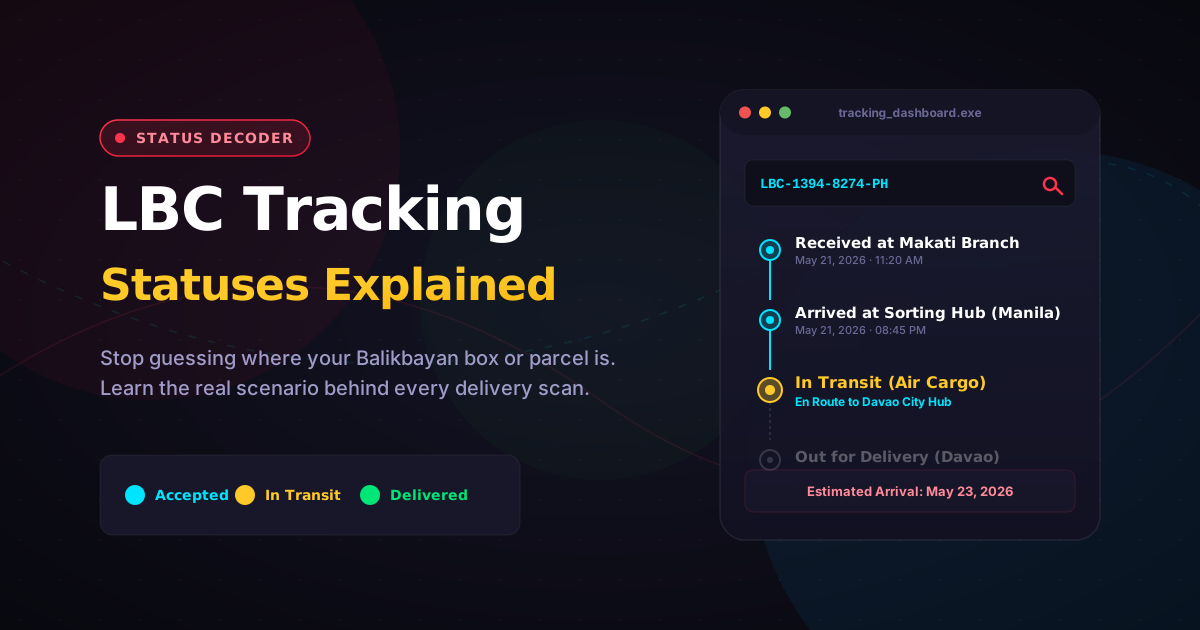
Ever stared at your screen refreshing the LBC tracking page at 2:00 AM, wondering why your package has been “In Transit” for three days straight? I’ve been there. Nothing makes you more anxious than a padala that seems stuck in limbo, especially when it’s an important document or a Balikbayan box packed with love.
To decode an LBC tracking status, you just need to understand that each update represents a physical handoff between a courier, a sorting hub, and a delivery team. When you paste your 13-digit tracking number into our free LBC tracker, you’ll see real-time statuses (Accepted, In Transit, Out for Delivery, Delivered) within seconds. The real-time status tells you exactly who holds your parcel right now and whether a delay is normal or an actual red flag.
Here is the thing most online shipping guides won’t tell you: LBC processes millions of packages across 6,400+ branches in the Philippines. The system updates are automated, but the physical movement relies on local flights, ferry schedules, and weather conditions. Let’s look at what your current LBC status meaning actually translates to in the real world.
The Core Tracking Statuses (And What’s Happening Behind the Scenes)
When you monitor your shipment, your LBC tracking updates generally follow a standard timeline. But the corporate phrasing on the screen can sometimes hide what’s physically happening to your box.
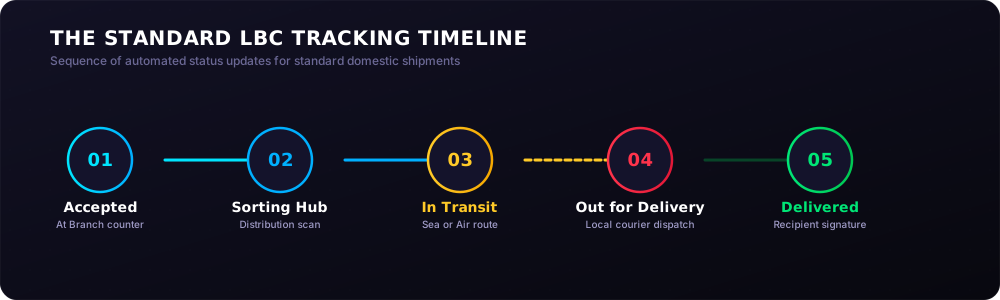
1. Accepted at Branch / Received at Origin
This means your package is officially in the system. The barcode on your receipt has been scanned at the counter.
- The Real Scenario: Let’s say you drop off a small X Pack pouch at an LBC branch in Makati on a Monday afternoon. The status changes immediately to “Accepted.” But here is a personal observation: if you drop it off after 2:00 PM, it will likely sit in that branch’s backroom until the evening consolidation truck picks it up. Your delivery window effectively starts the next day.
2. Arrived at Sorting Hub / Processing at Exchange
Your shipment has arrived at a major regional distribution center where automated belts and staff sort packages by destination zip codes.
- The Real Scenario: For a package moving from Manila to Davao, it will hit a massive central hub in Metro Manila first. If it arrives during a salary-day shopping spike or the December holiday rush, it might sit in “Processing” status for up to 24 hours. Don’t panic—this is just the system waiting to group your parcel with thousands of others heading to the Mindanao flights.
3. In Transit (The One That Trips Everyone Up)
This status simply means your package is on the move between two locations. It could be on a delivery truck, a cargo ship, or an airplane.
- The Real Scenario: I once tracked a Balikbayan box sent by a kababayan from Dubai to a family home in Quezon City. The status stayed as “In Transit” for days. Why? Because it was inside a sea container clearing the Bureau of Customs PH. If your package is moving between islands—like Manila to Cebu—“In Transit” usually means it’s waiting for its allocated slot on an inter-island commercial flight.
4. Out for Delivery
The package is inside a local delivery vehicle, and a rider is actively trying to reach your address today.
- The Real Scenario: LBC riders typically load their trucks and motorcycles early in the morning. If you see this update at 8:00 AM in Iloilo City, expect the rider before 6:00 PM.
Tip: Make sure someone is home with a valid ID. If it’s a Cash on Delivery (COD) order, ensure the exact peso amount (₱) is ready to prevent the rider from moving on to the next house.
5. Delivered
The delivery is complete. The system has recorded the signature of the recipient or an authorized person.
When “Normal” Statuses Mean Hidden Delays: 3 Real-World Scenarios
I see people stressing out in Facebook OFW groups all the time about their packages. Let’s look at three specific scenarios based on real routes to see when you should relax and when you should actually act.
Scenario A: The Stuck Inter-Island Shipment (Manila to Cagayan de Oro)
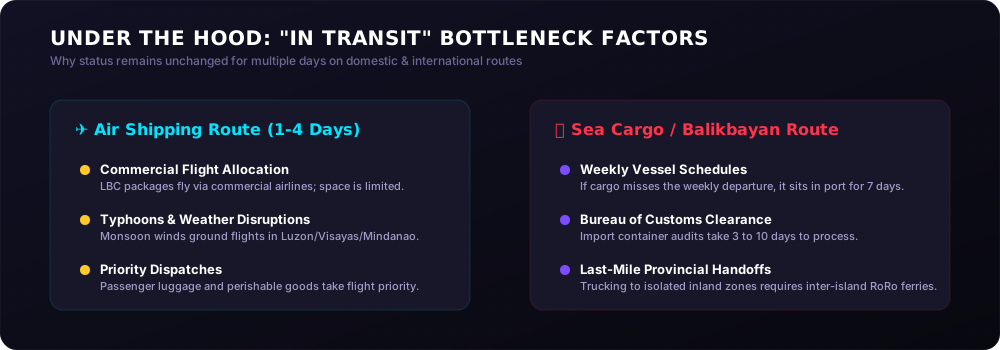
You shipped a package via First-Class air shipping from Manila to Cagayan de Oro. The estimated delivery time is 2 to 4 business days. By day three, the status is still stuck on “In Transit” at the Manila Hub.
- What’s actually happening: Commercial planes handle LBC’s air cargo. If a typhoon hits Luzon or the Visayas, flights get grounded, or passenger luggage takes priority over commercial cargo.
- My Advice: Give it an extra 48 hours if there is active bad weather. It almost always clears the minute the skies open up and flights resume.
Scenario B: The “Delivered to Agent” Status Confusion
You check your online LBC tracking tool and it says “Delivered to Agent,” but your recipient swears they haven’t received anything.
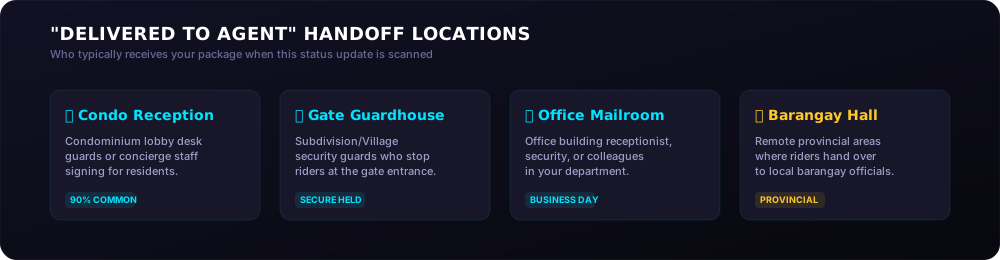
- What’s actually happening: This trips up almost everyone. “Delivered to Agent” does not mean your package was given to a stranger. It usually means the final delivery address is in a remote area or a restricted condominium/subdivision where LBC utilizes a third-party local courier or a barangay official to complete the last mile.
- My Advice: Check with your subdivision gate guards, your condo reception desk, or your local barangay hall before calling customer care. Nine times out of ten, it’s sitting safely at the front desk.
Scenario C: The Remote Area Edge Case (Shipping to Coron or Batanes)
You sent a package to an island destination like Coron, Palawan. The tracking status goes completely silent after saying “In Transit” from the regional hub.
- What’s actually happening: Competitor guides always skip this, but shipping to island municipalities relies heavily on weekly ferry and sea-cargo schedules. LBC rules state that deliveries to remote areas can take up to 9 business days or longer. The tracking won’t update while the container is on a vessel floating across the Sulu Sea.
- My Advice: Do not expect daily updates for island routes. Track the package on day 5 and day 8—expecting real-time tracking out on the open water will just break your heart.
Decoding Error Statuses and What to Do Next
Sometimes things go sideways. If you see these specific updates on your LBC tracking online dashboard, you need to know how to react.
| Tracking Status Update | What It Actually Means | Your Immediate Next Step |
|---|---|---|
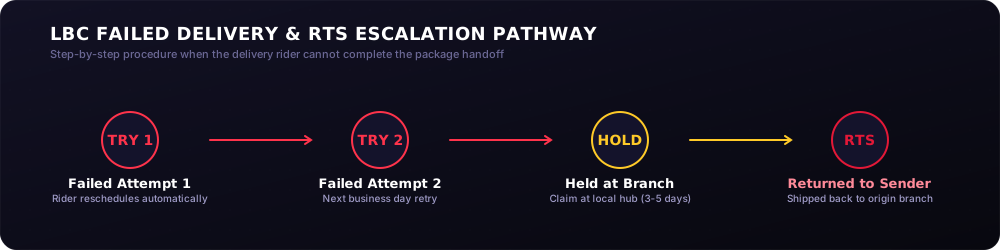
| Failed Delivery Attempt | The rider went to the house but nobody answered, or the COD cash wasn’t ready. | LBC will automatically try again the next business day. Learn more in our guide on what to do when LBC delivery attempt failed. |
| Held at Branch | The package cannot be delivered due to an incomplete address, or you requested a branch pickup. | Refer to how long LBC holds undelivered packages to avoid RTS. Contact LBC support immediately. |
| Return to Sender (RTS) | Delivery failed multiple times, or the package contains prohibited items. | The package is going back to the origin branch. You will need to visit the branch to reclaim it and figure out the issue. |
How to Handle an Unresponsive Tracking Page
If you enter your 13-digit tracking number and get an error message saying “No record found,” don’t assume your parcel is lost.
I’ve noticed this happens constantly with online purchases. If you buy an item from a seller on Shopee, Lazada, or Facebook Marketplace, they might generate the shipping label at home on a Sunday night. They will send you the tracking number immediately, but the status won’t go live until the LBC rider physically collects the items and scans them on Monday afternoon.
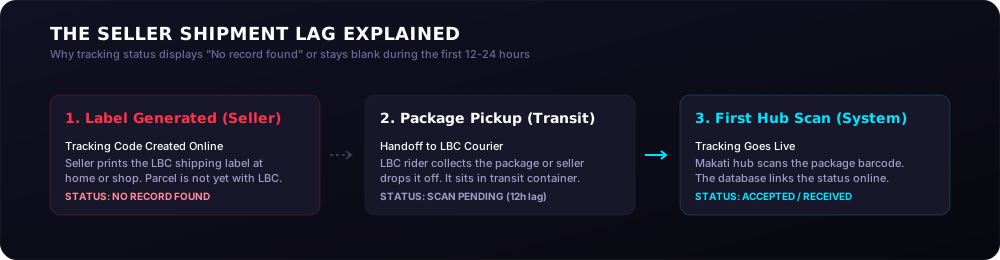
Give the system at least 12 to 24 hours to refresh. If it’s still blank after a full day, verify the 13 digits on your receipt or contact the seller to make sure they actually handed the package over to LBC. For more info, read our guide on what to do if LBC tracking is not updating.
Frequently Asked Questions
Does LBC deliver on Sundays and holidays?
No, LBC does not typically deliver packages on Sundays or official national holidays, though branch operations for drop-offs and pickups remain open at select mall locations. If your package goes “Out for Delivery” on a Saturday afternoon and misses the cut-off time, the rider will resume the delivery attempt on Monday morning.
How many times will LBC try to deliver my package before sending it back?
LBC will make up to two delivery attempts before moving your package to a “Held at Branch” status. If both attempts fail because nobody was home to pay for a COD package, you have to claim it at the designated local hub within a few days or it goes into the LBC return to sender process workflow.
Why is my package stuck at the “Sorting Hub” for more than two days?
Your package is likely undergoing an internal security inspection, dealing with a high-volume seasonal backlog, or waiting for specific regional transport space. This happens frequently at the central Manila hub during major e-commerce monthly sales events like 11.11 or 12.12 when volume overloads the standard processing speed.
Can I change my delivery address while the package is “In Transit”?
No, you cannot alter the delivery address once the shipment is actively moving through the network. If you notice a critical typo in the address line, you must call the Metro Manila hotline at 8-585-999 immediately so customer service can flag the parcel at the final destination sorting hub before it goes out with a delivery rider.
What should I do if my tracking status says “Delivered” but I didn’t receive anything?
Check with family members, housemates, neighbors, or your building’s security guards first to see if they signed for the parcel on your behalf. If no one has it, review the digital delivery receipt via the LBC Express tracking guide portal to check the printed name of the person who accepted it, or contact their customer care email at customercare@lbcexpress.com to file an immediate investigation.
Final Thoughts: Don’t Panic, Just Track Smart
At the end of the day, the data on your screen is only as fast as the human being scanning the box. Trust the process, look at the route your package is taking, and keep local weather conditions in mind.
If your shipment is truly delayed past the official service speed window reach out to their team using the official channels. For the rest of your everyday shipments, just keep our complete tracking guide bookmarked so you can always cross-reference your updates without the stress.
🔗 Related Guides & Reading
If you want to read more about specific LBC Tracking guides, check out our latest articles:
- How to Track Your LBC Package — A comprehensive roadmap and overview of the entire shipping lifecycle.
- What to Do If LBC Tracking Is Not Updating — Steps to take if your shipment status feels stuck or unresponsive.
- How Long LBC Holds Undelivered Packages — Avoid packages being sent back to the sender by knowing pickup deadlines.
- LBC Delivery Attempt Failed Meaning — What happens after a failed delivery attempt and how to coordinate a retry.
Verified against LBC Express Official Support published operational schedules and terms of service.