Tracking Help · May 23, 2026
LBC Tracking Not Updating? Here Is Why & How to Fix It
Staring at a stuck LBC tracking page? Discover real reasons for delays, route quirks, and how to fix an LBC tracking not updating issue today.
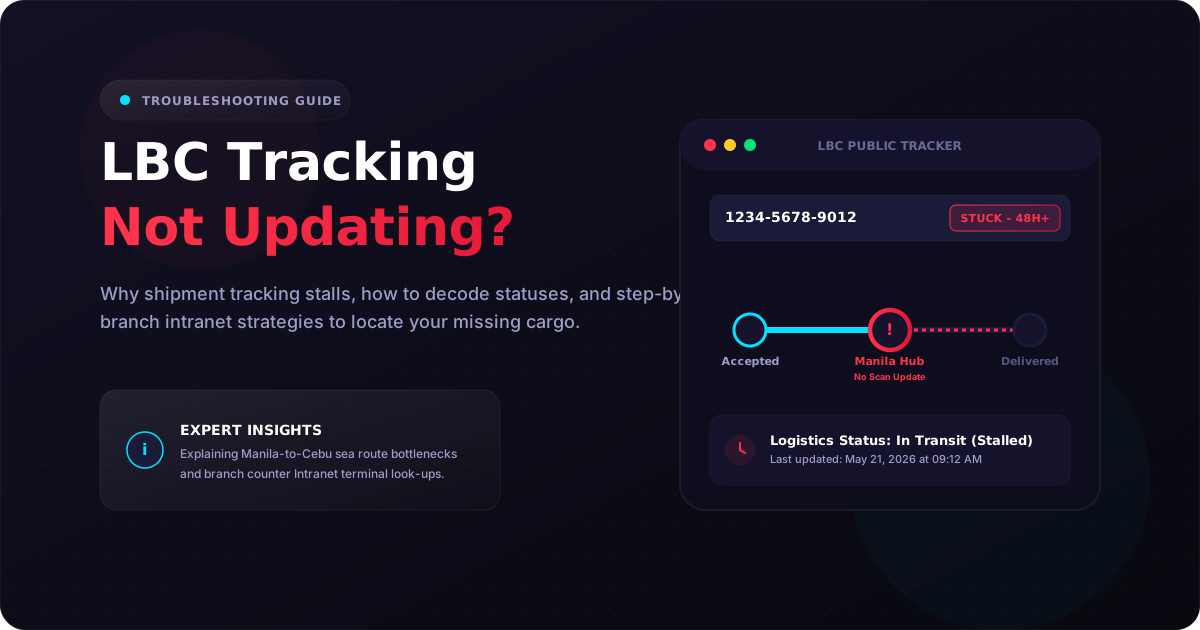
Nothing makes you refresh a browser page more than an LBC tracker that hasn’t moved in 48 hours. If your LBC tracking is not updating, it usually means your package is sitting securely in a regional sorting hub waiting for an inter-island flight, clearing customs, or stacked in a maritime cargo container.
I track packages through LBC 4–5 times a week, and I’ve learned that a frozen status doesn’t mean your package is lost. It just means the physical box has outrun its last digital checkpoint scan.
Here is the honest, real-world breakdown of how to troubleshoot a stuck tracker and get actual answers from the counter.
Why Your LBC Tracking Status Isn’t Moving: The Core Reasons
Ever stared at a tracking page that says “In Transit” for three days straight? I have. It is an incredibly common LBC tracking issue. Here is what is actually going on when the system seems frozen.

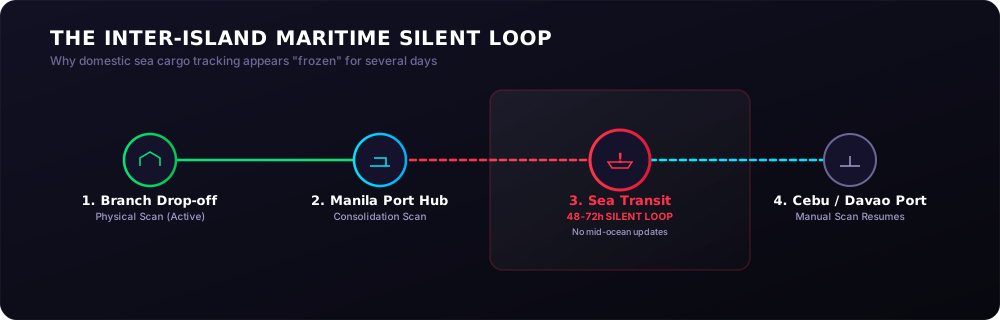
1. The Inter-Island Maritime Loop (The Manila-to-Cebu Silent Period)
When you ship heavier parcels or standard Balikbayan boxes across regions, they don’t jump on airplanes immediately. They go onto sea vessels.
In my experience, if you ship an item via standard sea cargo from Manila to Cebu or Davao, your tracking status will freeze at “At Hub” or “In Transit” for 48 to 72 hours. The system won’t update until the container ship drops anchor, offloads the freight, and a worker manually scans your specific pallet at the destination port hub.
2. High-Volume Backlogs (Salary-Day Spikes and Holiday Rushes)
LBC manages over 6,400 branches in the Philippines. On regular days, packages move like clockwork. But during salary-day spikes (the 15th and 30th of the month) or the intense December holiday rush, processing centers handle millions of items.
Your package might physically arrive at a distribution center on time, but it can sit in a physical queue for 24 hours before a sorting agent passes it under a barcode scanner.
3. The Shopee and Lazada Digital Delay
This trips up almost everyone. If you buy an item on an e-commerce platform and receive an LBC tracking number, that number is generated electronically when the seller prints the shipping label.
The tracking status will say “Accepted” or “Pending Pickup” for days if the seller hasn’t actually handed the item over to the LBC rider. The LBC package delayed issue here isn’t an LBC problem; it’s a merchant fulfillment delay.
Real-World Scenarios: How to Interpret Your Stuck Tracker
Let’s look at three specific real-world shipping routes and tracking scenarios that I’ve dealt with or documented recently. These show exactly how local realities change your tracking timeline.
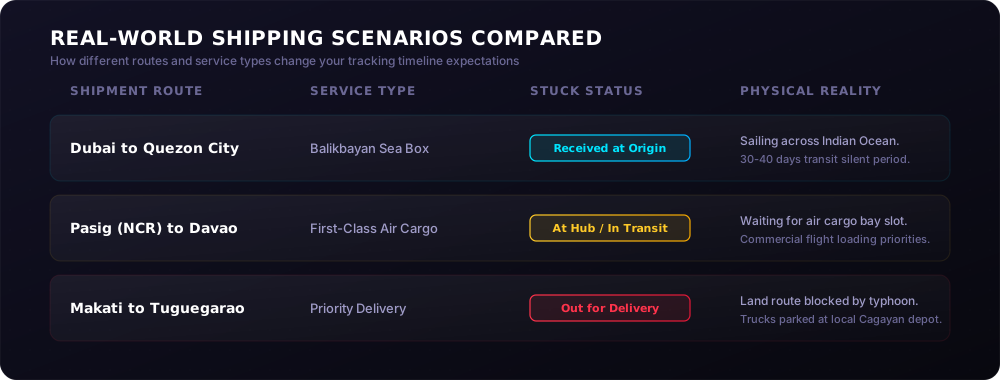
Scenario A: The OFW Balikbayan Box (Dubai to Quezon City)
A kababayan sends a large Balikbayan box filled with chocolates, appliances, and clothes from Dubai to a family home in Quezon City. The status stays stuck on “Received at Origin Hub” for nearly two weeks.
- The Reality: This is completely normal. Sea freight takes 30 to 40 days. The tracking system will not show intermediate progress updates while the cargo ship is crossing the Indian Ocean. Trust me on this one: the status will change in one giant leap once the container hits the Bureau of Customs PH processing facility in Manila.
Scenario B: The Domestic E-Commerce Order (Pasig to Davao City)
An online seller drops off an electronic component at an LBC branch in Pasig, Metro Manila, bound for a buyer in Davao City via First-Class service. The tracker says “In Transit” on Tuesday morning, but by Thursday night, nothing has changed.
- The Reality: LBC’s typical NCR-to-Mindanao delivery window is 2 to 6 business days. When air cargo space fills up with premium Priority Delivery parcels, standard First-Class parcels are held safely inside the airport hub warehouse for the next available commercial flight cargo bay. It usually clears within 24 hours without any hotline intervention.
Scenario C: The Extreme Weather Delay (Makati to Tuguegarao)
You send important business documents from a corporate branch in Makati to a branch in Tuguegarao, Cagayan via Priority Delivery. The package left on Monday, but by Wednesday, the status shows “In Transit” with no estimated delivery date.
- The Reality: This happens during typhoon season. Land routes through Northern Luzon often face severe delays due to heavy rainfall or flooded road arteries. LBC trucks will park at local hubs until the roads are safe. If your tracking goes dark during bad weather, check the weather advisories before calling customer support.
Step-by-Step Guide: What to Do When Your Tracking Stalls
If your package has been stuck on the exact same status for more than three business days (excluding Sundays and official holidays), don’t panic. Follow this step-by-step process that I use to trace problematic shipments.

Step 1: Verify the Tracking Format
Make sure you are typing the number correctly. The official LBC tracking number format is exactly 13 digits long (e.g., 1234-5678-9012). If you are copying a tracking code from a third-party marketplace web dashboard, strip out any spaces, dashes, or accidental letters. You can use our free LBC tracker on the homepage to instantly pull the raw data log, or check our comprehensive how to track LBC Express package guide for a full breakdown of the shipping lifecycle.
Step 2: Calculate the Real Business Days
LBC does not process standard deliveries on Sundays or major national holidays. If you dropped off your package on a Saturday afternoon, day one of the shipping window doesn’t actually begin until Monday morning. Check the service type on your receipt. Priority takes 1–2 days, First-Class takes 2–4 days, while shipments to remote areas like Coron or Batanes can take up to 9 days naturally.
Step 3: Check for Local Exceptions
Look at the last recorded location on your tracking log. If it says “Held at Branch” or “Returned to Sender,” you need to act. Read through our deep dive on why LBC returns packages to sender or our LBC branch pickup guide to see if a mismatched address or a failed Cash On Delivery (COD) cash collection caused the issue.
Step 4: Use the Internal Branch Escalation Method
Most guides tell you to call the generic hotline immediately. Here is a better workaround that I have used successfully multiple times:
Instead of calling, take your original physical receipt or a screenshot of your tracking screen directly to your nearest physical LBC branch. The counter agents have direct access to an internal logistics terminal known as the LBC Intranet System. This backend tool shows granular container numbers, dispatch driver profiles, and exact warehouse bin coordinates that are never displayed on the public customer-facing tracking page.
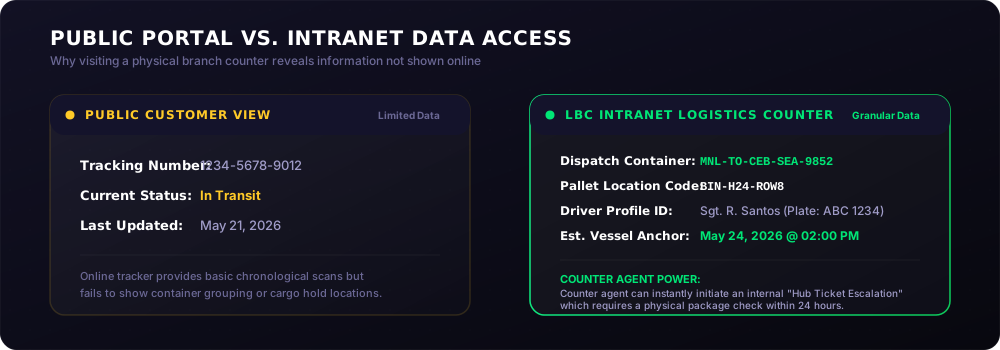
If the parcel is truly stuck, the branch supervisor can log an internal “Ticket Escalation” that forces the target distribution hub to run a physical inventory check within 24 hours.
Step 5: Contact Official Support Channels
If you cannot visit a branch, reach out to the central customer care team using these verified coordinates:
- Metro Manila Customer Hotline: 8-585-999
- Provincial Toll-Free Line: 1-800-10-8585999
- Official Corporate Email: customercare@lbcexpress.com
- Official Website Help Desk: LBC Express Official Support
Understanding Tricky Tracking Statuses
Sometimes the issue isn’t that the tracker isn’t updating, but rather that it is stuck on a confusing phrase. A lot of people think certain statuses mean their box is lost forever. Big difference.
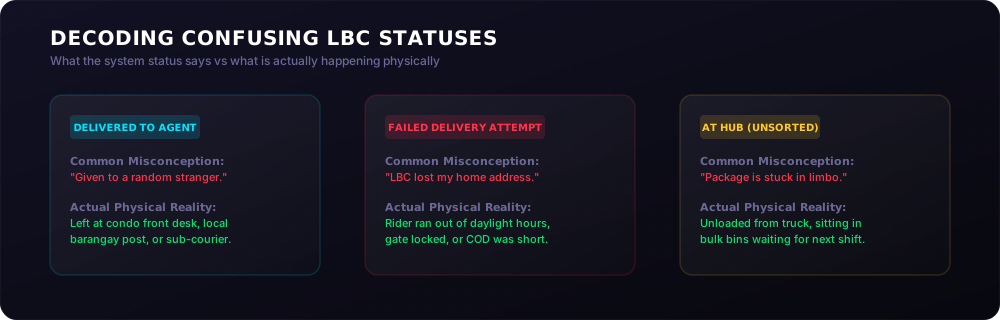
- “Delivered to Agent”: This does not mean it was delivered to a random stranger. It means your package was safely dropped off at a sub-contracted local courier partner, a remote island drop-off point, or your neighborhood condo’s security desk because the main LBC delivery vehicle could not access the street.
- “Failed Delivery Attempt”: This usually means the driver ran out of daylight hours during their route or could not locate your house door. You can read the full breakdown of this issue in our guide on failed delivery attempts explained.
- “At Hub (Unsorted)”: The package has been unloaded from the truck or plane and is sitting inside a large plastic bin waiting to be sorted by destination zip codes. It will stay on this status until the next shift begins.
Frequently Asked Questions
Why is my LBC tracking number not found in the online tracking system?
Your tracking number will show as “Not Found” if it was generated within the last few hours or typed incorrectly. It takes time for the physical branch clerk to sync their offline desktop cash register data with the central internet servers. I always recommend waiting until after 8:00 PM on the day of drop-off to check the status online.
Does LBC deliver on Sundays and public holidays in the Philippines?
LBC does not run regular home delivery operations on Sundays or official national holidays. Packages remain safely locked inside regional sorting centers during these days. If your tracker stalls over the weekend, it will start moving again on Monday morning when the first line-haul transport trucks depart.
How long will LBC hold a package at a branch if the delivery driver fails?
LBC holds undelivered or branch-pickup packages for exactly 5 to 15 calendar days depending on the item type. Standard parcels are held for 5 days, while cash-on-pickup or international items can stay in the backroom for up to 15 days. For more specifics, check our full article on how long LBC holds undelivered packages.
Can someone else pick up my package if the status is stuck at “Held at Branch”?
Yes, an authorized representative can claim your cargo if you cannot go yourself. They must bring a signed authorization letter, a valid government ID, and a copy of the 13-digit tracking number. You can find the explicit paperwork requirements over in our LBC branch pickup guide.
What should I do if my LBC tracking status is stuck on “Out for Delivery” for two days?
Go to our LBC branch locator page, find the exact neighborhood hub responsible for your delivery area, and visit them with your tracking number. An “Out for Delivery” loop usually means the rider had trouble finding your exact street address or ran out of delivery time before returning the parcel to the local depot warehouse at night.
Final Thoughts: Staying Patient with Your Padala
At the end of the day, shipping networks are massive, physical operations run by real people dealing with traffic, flight availability, and changing weather conditions. If your tracker stops moving for a day or two, give it a little time.
If you want to keep tabs on your package without reloading the same page over and over, you can bookmark our online LBC tracking tool or read through our complete tracking guide to master every single logistics code in their system. Keep your receipt handy, watch the calendar, and stay safe out there!
🔗 Related Guides & Reading
If you want to read more about specific LBC Tracking guides, check out our latest articles:
- Guide to LBC Cash on Pick-up (COP) — Complete, step-by-step walkthrough for sending and claiming COP branch shipments.
- How to Track LBC Express Package — A comprehensive roadmap and step-by-step walkthrough of the shipping lifecycle.
- LBC Tracking Statuses Explained — Decode the precise meaning behind statuses like In Transit or Delivered to Agent.
- How Long LBC Holds Undelivered Packages — Prevent your packages from going to Return to Sender (RTS).
- Can Someone Else Claim My LBC Package — Rules, proxy pickups, and required documents.
Verified against LBC Express Official Support published operational schedules and terms of service.